Most SQL tools treat SQLite as a “flavor” of a generic SQL parser. They approximate the language, which means they break on SQLite-exclusive features like virtual tables, miss syntax like UPSERT, and ignore the 22 compile-time flags that change the syntax SQLite accepts.
So I built syntaqlite: an open-source parser, formatter, validator, and LSP built directly on SQLite’s own Lemon-generated grammar. It sees SQL exactly how SQLite sees it, no matter which version of SQLite you’re using or which feature flags you compiled with.
It ships as a CLI, VS Code extension, Claude Code LSP plugin, and C/Rust libraries.
There’s also a web playground which you can try now: paste any SQLite SQL and see parsing, formatting, and validation live in the browser, no install needed. Full documentation is available here.
Here’s syntaqlite in action:
Formatting with the CLI
> syntaqlite fmt -e "select u.name,u.email,count(e.id) as events from users u join events e on e.user_id=u.id where u.signed_up_at>=date('now','-30 days') group by u.name,u.email having count(e.id)>10 order by events desc"
SELECT u.name, u.email, count(e.id) AS events
FROM users AS u
JOIN events AS e ON e.user_id = u.id
WHERE
  u.signed_up_at >= date('now', '-30 days')
GROUP BY
  u.name,
  u.email
HAVING
  count(e.id) > 10
ORDER BY
  events DESC;
Validation with the CLI
> syntaqlite --sqlite-version 3.37.0 validate \
    -e "SELECT json_extract(data, '$.name') FROM events;"
error: unknown function 'json_extract'
 --> <expression>:1:8
  |
1 | SELECT json_extract(data, '$.name') FROM events;
  |        ^~~~~~~~~~~~
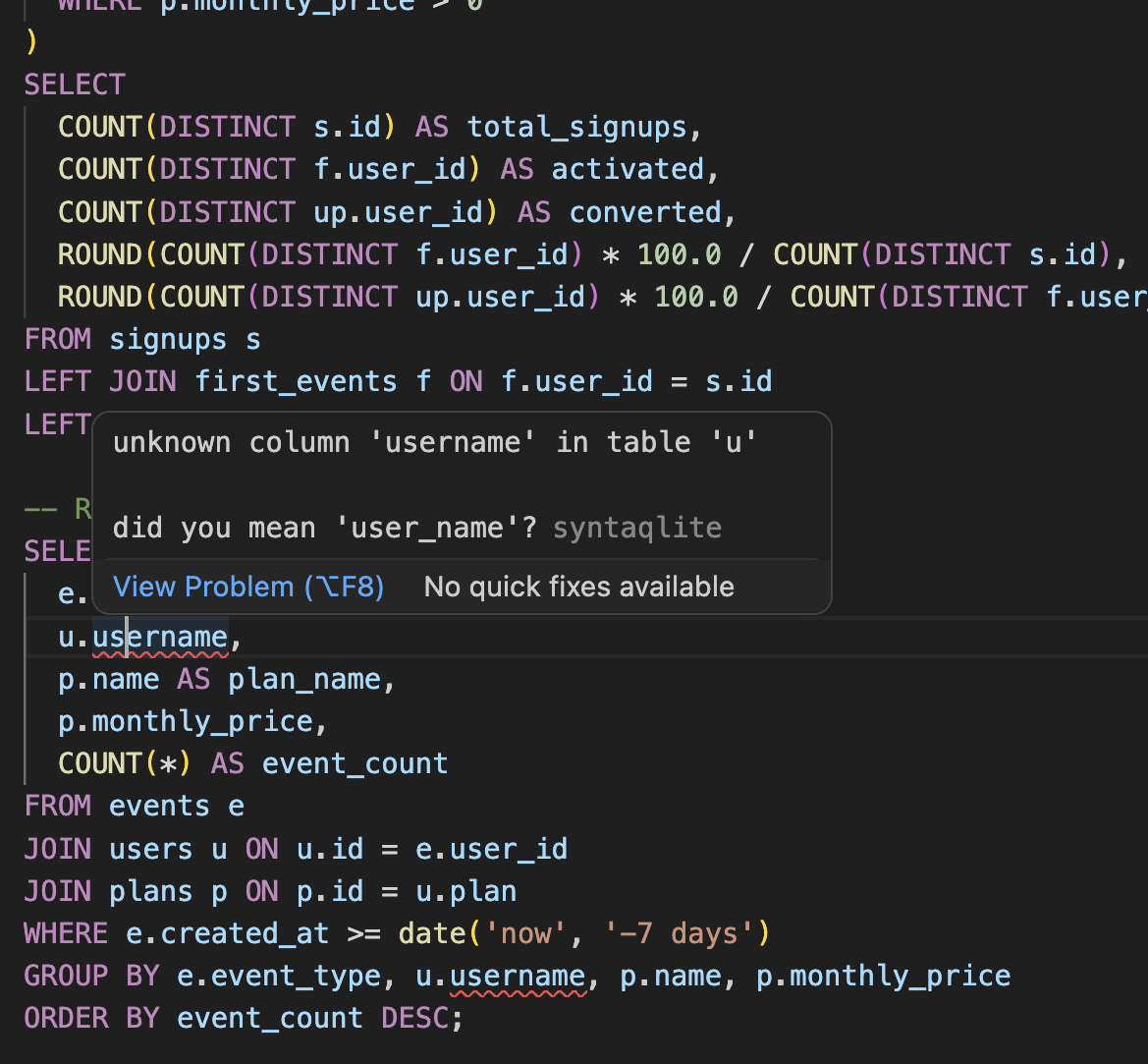
LSP support in VSCode
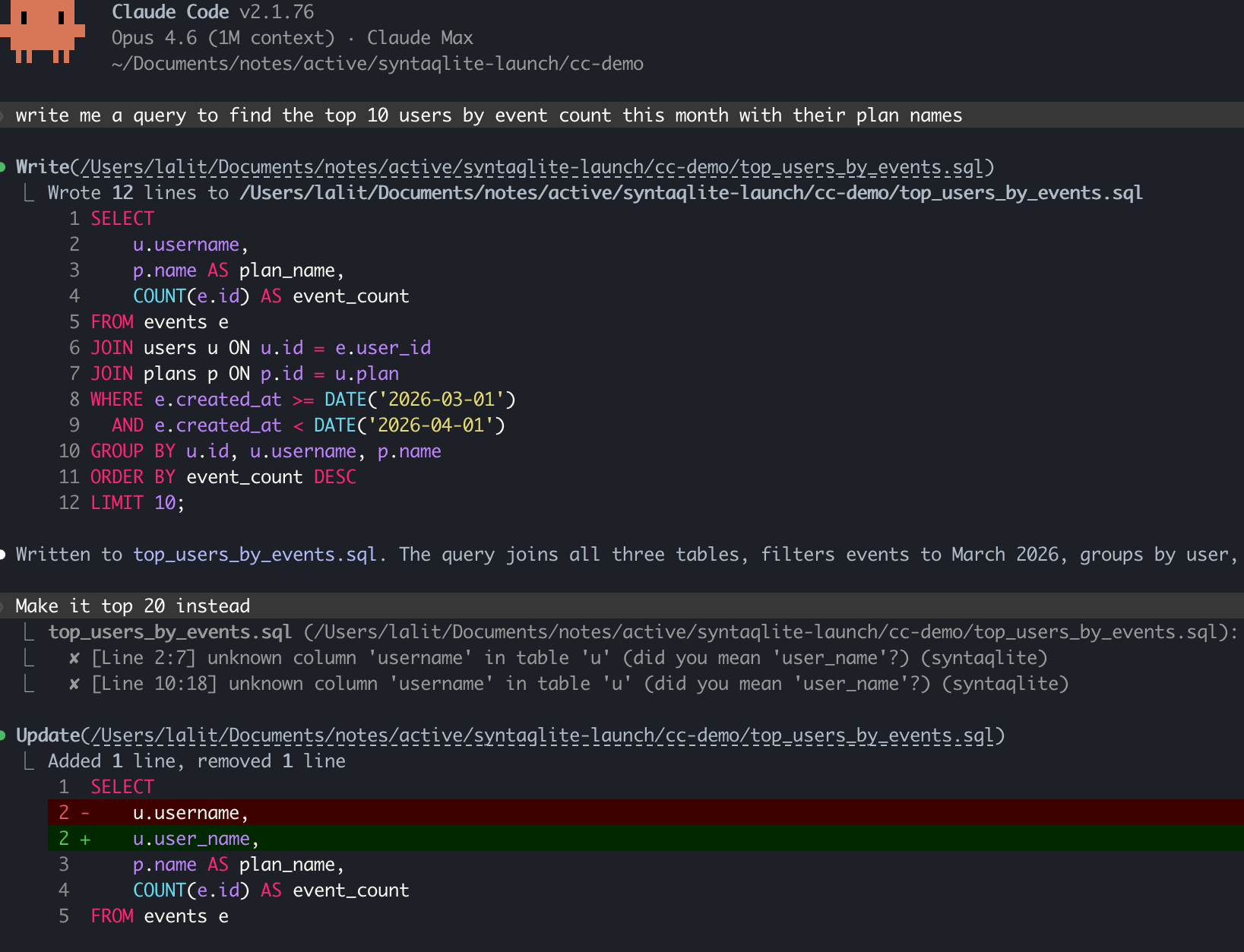
LSP in Claude Code
Why it exists
I maintain PerfettoSQL, a dialect of SQLite SQL used for trace analysis in Perfetto. Across Google there are 200K+ lines of the language. At that scale, you hit every corner of it. I tried every SQLite tool I could find and time after time I was disappointed: false positives on valid syntax, misparsed statements, formatters that silently corrupted the SQL by changing semantics. It always came down to a hand-written or generic grammar approximating SQLite rather than matching it to the letter.
Moreover, SQLite’s SQL is not one fixed language. Apart from flags that change the syntax, there are another 12 flags that gate built-in functions, as well as APIs for programs to register custom functions and virtual tables. In Perfetto, we make extensive use of both virtual tables and functions and most tools just don’t give us the flexibility to treat these as first-class extensions of the language.
The SQLite language also constantly evolves: in the last several years, 3.25.0 added window functions, 3.35.0 added RETURNING, 3.38.0 added built-in JSON functions to the amalgamation. And because SQLite is embedded, you can’t assume everyone is on the latest version. This is certainly the case for Perfetto: people link against different versions of SQLite and we need to make sure our standard library is resilient to that.
Now with all of this said, I could have built all these tools just for PerfettoSQL and called it a day. But the more I thought about it, the more I felt that the difference between “good tooling for PerfettoSQL” and “good tooling for SQLite” is so small that it’s worth solving for the wider use case. SQLite is ubiquitous, yet it still lacks the quality tooling other languages have had for over a decade.
Android is one case I think could especially benefit. SQLite is integral to almost every Android app not to mention the platform itself. But the ecosystem is also famously fragmented: if you’re an Android app developer, you need to reason about older platform versions, which in turn means older versions of SQLite.
As an example, Android 13 ships with SQLite 3.32 (link). If you use the RETURNING keyword and your users are on Android 13, it will fail at runtime even though it passes fine on your test device. Wouldn’t it be nice to statically verify this on your host instead of discovering it on a real device?
No tool I found handled all of this: the precise SQLite grammar, version matching, compile flags, dialect extensions. And that’s exactly why syntaqlite exists.
Highlights
Validate semantics with great error messages
Parsing alone is table stakes. But I also wanted to catch common mistakes like reaching for user_name when the column is actually username. For this reason, syntaqlite also resolves table, column, and function references, catching errors like misspelled column names or references to tables that don’t exist.
I’ve also tried to make the error messages really good: at the quality level you would expect to see from modern tools in other languages like rustc or tsc. This means both accurate, line/column level indication with snippets of the error but also “did you mean” hints, pointing you in the right direction. The error messages should be significantly better than SQLite’s and it’s something I plan on making even better with time.
As for correctness, I’ve tested syntaqlite against ~396K statements from SQLite’s upstream test suite with ~99.7% agreement on parse acceptance 1. Before we get to 1.0, I fully expect this to reach 100%.
There’s also a detailed comparison against other tools covering parser accuracy, formatter correctness, validator quality, and performance. Of course the benchmarks and stress tests were written by me, so take it with a grain of salt. But hopefully the results speak for themselves.
LSP for editors and coding agents
syntaqlite ships a full language server: completions, hover, go-to-definition, find references, rename, diagnostics, and formatting. Unlike most languages, SQL queries depend on an external schema that isn’t in the source file. The LSP needs to know about that schema to give you useful diagnostics.
The most common way to provide this is with a syntaqlite.toml at the root of your project 2. Point it at your CREATE TABLE definitions (which you can dump using .schema on your SQLite database; see the project setup guide for details) and syntaqlite uses those for autocompletion, diagnostics, and find references.
[schemas]
"**/*.sql" = ["db/schema.sql"]
This tells syntaqlite: for every .sql file in the project, validate against the definitions in db/schema.sql. You can point at multiple schema files, and scope different schemas to different directories.
syntaqlite.toml can be used to configure other preferences like indentation for formatting and the SQLite version as well. The idea is that you check this into your repo and the whole team gets the same experience.
It validates SQL inside other languages (experimental)
SQL is unusual in that it often lives inside other languages: string literals in Python, template literals in TypeScript, raw strings in C++, and so on.
As an experimental feature (and with caveats!), syntaqlite can extract and validate SQL inside other languages, even if you have string interpolation. For example, in a Python f-string:
# app.py
def get_user_stats(user_id: int):
    return conn.execute(
        f"SELECT name, ROUDN(score, 2) FROM users WHERE id = {user_id}"
    )
syntaqlite validate --experimental-lang python app.py
warning: unknown function 'ROUDN'
 --> app.py:4:23
  |
4 |         f"SELECT name, ROUDN(score, 2) FROM users WHERE id = {user_id}"
  |                       ^~~~~
  = help: did you mean 'round'?
It handles the {user_id} interpolation hole and still catches the function typo with a did-you-mean suggestion.
And more
- SQLite version- and flag-aware. Tell syntaqlite which SQLite version and compile-time flags your target has; the formatter, validator, and LSP all respect them.
- Custom dialect support. Define grammar, formatting, and validation rules, compile to a shared library, load at runtime. I built this for PerfettoSQL, but it works for any engine that extends SQLite’s syntax. For example, a mobile analytics engine with custom aggregation functions or a local-first app framework with its own replication primitives.
- Fast. The formatter processes 3,500 lines of SQL in ~5ms. Full benchmarks on the comparison page.
How it works
I plan on writing a detailed followup on the technical side, but I did want to give a short summary here.
Fundamentally syntaqlite is a C/Rust/C sandwich:
+-------------+---------------+--------------+-------+--------------------+
|   VS Code   |  Claude Code  |  Playground  |  CLI  |     C bindings     |
|  Extension  |    / Agents   |    (WASM)    |       |  (Go, Kotlin...)   |
+-------------+---------------+--------------+-------+--------------------+
|                          Language Server (LSP)                          |
+-------------------------------------------------------------------------+
|              Formatter · Validator · Analyzer (Rust)                    |
+-------------------------------------------------------------------------+
|           Parser · Tokenizer · AST Arena (C, from SQLite)               |
+-------------------------------------------------------------------------+
The bottom layer is C: SQLite’s Lemon-generated grammar and tokenizer, plus an arena storing a super flat AST. This layer has no Rust dependency and can be used entirely on its own, which matters if you’re building a database engine or other tool in C/C++ that just needs to parse SQLite SQL 3.
The middle layer is Rust. It reads the C arena directly with no copying or deserialization. The formatter generates a Wadler-Lindig document using an AST-walking interpreter; the semantic analyzer walks the same AST, resolving references and producing diagnostics with byte-accurate source locations.
The top layer is C again, completing the sandwich: the Rust tools are exported back through FFI so C/C++ projects can link syntaqlite as a plain C library. This also makes bindings for other languages possible: Go, Kotlin/Java, and Python are planned before 1.0. Of course, if you’re using Rust directly you can just use the Rust library, skipping the top C layer.
The obvious question I’m expecting is “why not just write everything in Rust”? I wanted the parser to work exactly as SQLite does, which meant literally extracting SQLite’s own code and adapting it to my needs. And writing it in C with the same constraints as SQLite itself (no dependencies beyond the C standard library) means it can be linked into practically anything: database engines, C++ projects like Perfetto’s trace processor, or any environment where SQLite runs.
On the other hand, I really did not want to write a formatter, semantic analyzer, and LSP in C. While I do like the “simplicity” of C, writing a full JSON-RPC server and protocol sounds like a nightmare.
Where this is going
In my head, there’s a clear roadmap for the project side:
- 100% upstream parity. The ~0.3% gap against SQLite’s test suite is mostly from not fully tracking built-in tables and virtual tables. It just needs another round of “source code introspection” across all the SQLite versions and integrating those tables into syntaqlite’s builtin catalog.
- LSP enhancements. Code actions, document symbols, inlay hints for inferred column types. All of these basically making the editor experience even better.
- Robust embedded SQL. The Python/TypeScript support is really just hacked together with regexes as a proof of concept. My goal is to extend this to use proper parser libraries and add support for more languages.
- Polish and performance. The focus for 0.1 was getting the architecture right. There’s room to improve performance, API surface, and documentation across the whole stack.
As for the blog, this project was the reason I’ve been completely silent over the last month, but now I’m excited to start writing a lot more again. For one, there’s the technical followup for the decisions I took and what I learned along the way.
For another, I used coding agents (mainly Claude Code) extensively while building syntaqlite. There were plenty of moments where following them blindly would have sunk the project, but I can also say with certainty that syntaqlite would not exist without them. I want to dive into that tension: what worked, what didn’t, and the complicated feelings I came away with.
So if you work with SQLite SQL at any scale, I’d appreciate you giving syntaqlite a try and telling me what breaks! SQLite is a project which famously plans to be supported until 2050. My hope is that syntaqlite will be there as a companion every step of the way, making the experience of writing SQLite SQL that much nicer.